


Control Tower is a tool used to manage complex enterprises in AWS, through the use of organizations and accounts that can be provisioned from Control Tower with the proper security and governance necessary when deploying to AWS at scale. This becomes especially important to Financial Services Enterprises that have complex organizations, with multiple Business Units, Products, and Applications with a variety of compliance requirements. Control Tower can be leveraged to create the security and compliance guardrails and deploy them at scale.
Background
Large Financial Services companies often have extremely complex organizations. These organizations often have multiple lines of business with applications that cover a global footprint. These scenarios lead to a variety of compliance requirements that need to be addressed.
As an example, let’s take a Financial Services Company that has 2 headquarters, one in London and the other in New York. They have a couple of major products (payments and investment) that have different geographical footprints. The payments product is used exclusively in the US and must adhere to PCI compliance, and the investment product is used both across the US and Europe and must adhere to FINRA Compliance.
In this scenario, there are several problems that this enterprise will face as they migrate to the Cloud.
| Problem | Details |
| Separation of Environments | Security best practices dictate that environments be restricted in both user and programmatic access to only those who need it. Environments will need to be separated by the lifecycle of the application (dev, QA, or prod), and by the Business Unit that supports it. |
| Enterprise Security | With the separation of environments, Enterprise Security Teams need to enforce the proper security controls, while still allowing the Business Units to add on their own controls. |
| Access and Support of Environments | The separate Business Units will each have their own support models and teams in leveraging the cloud. Giving each business unit the ability to manage their piece of the cloud while collaborating – without interfering – with other Business Units becomes essential and complex. |
| Consistent Compliance at Scale | Having so many environments and applications with different compliance requirements increases the risk for variation in the guardrails required to become compliant. This variation leads to increased risk of mistakes leading to non-compliance, reputational risk, and security incidents. |
| User Access | Enterprises will need to be able to restrict access in simple automated methods that allow for developers, support engineers, security teams, billings agents, etc. to request and receive access when needed to the required environments. |
| Custom-built Implementation | Implementing the requirements required custom-built solutions that were complex to produce and difficult to maintain. |
Let’s look at an example of how this enterprise would usually go about creating a new AWS Account. A Business Unit would create a request for an enterprise cloud team to create the requested account. This would have involved lengthy conversations between the application, cloud platform and security architects to determine the controls needed to be put in place and the effort needed to do so. After several weeks of conversations, it would take several more weeks of coding work to get the account, network and security controls put in place to have an environment ready for development consumption.
Each account created would have its own variation of compliance guardrails, user access controls would need to be configured for each new account, Business Units collaboration and separation could be handled in different ways, and enterprise security would need to be considered and implemented during the build phase. These action items would increase the time to create a new account and increase the chance the new account does not align with security and compliance standards.
Solution
AWS Control Tower is a tool that is well-equipped to handle the complex requirements of security and compliance, keep costs of implementation low, and improve the time to market in a consistent, durable manner.
With the given scenario above, let’s look at how AWS Control Tower could handle the situation – much of it out of the box – to drive the business outcome of decreasing risk, improving operational efficiency, and accelerating innovation.
AWS Control Tower provides you the ability to easily set up and govern a secure, compliant, multi-account AWS environment. With AWS Control Tower, builders can provision new AWS accounts in a few clicks, while you have peace of mind knowing your accounts conform to both your company-wide, regional government, and application-specific policies.
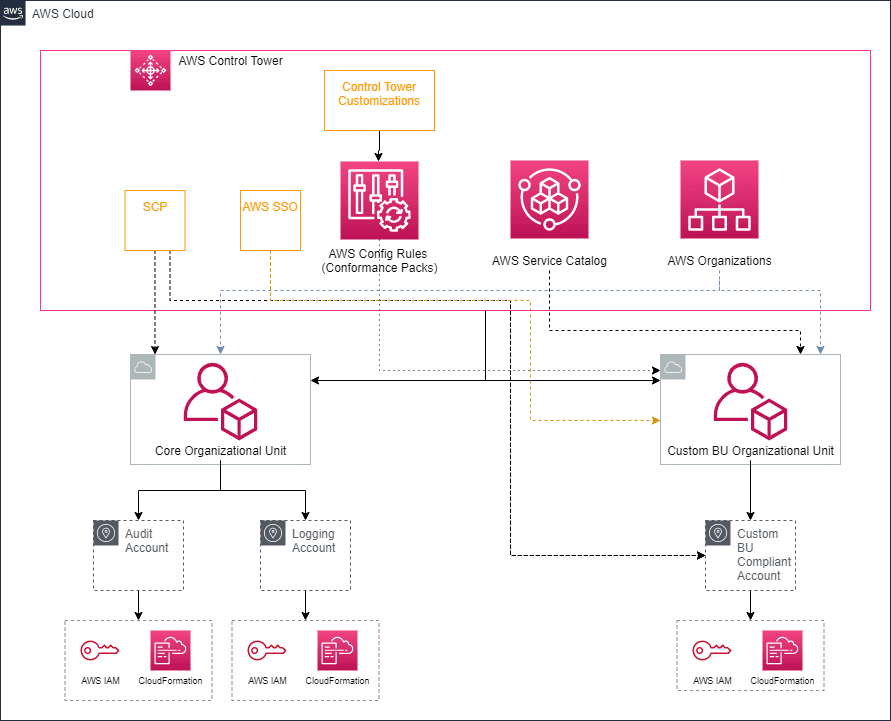
Control Tower solves the above problems by utilizing AWS Resources to help with governance. The below table lists the problems described above with the Solution and AWS Services that are utilized as a part of Control Tower.
| Problem | Solution | AWS Services |
| Separation of Environments | Control Tower segregates accounts and controls by utilizing AWS Organizations, allowing for guardrails to be established at multiple layers in Control Tower. This is essential in creating environments that are compliant with Financial Services regulations, segregating environments and applications by the types of compliance allows for quick, secure creation of compliant environments. | AWS Organizations |
| Enterprise Security | Control Tower utilizes both preventative (Service Control Policies) and detective (AWS Config) guardrails that can be applied to Organizational Units or individual Accounts from a central management console. | Service Control Policies (SCPs), AWS Config, Conformation Packs |
| Access and Support of Environments | AWS Permission Boundaries are utilized to place guardrails around the types of access that different Users can create, giving them the ability to support their own environments, without the oversight of enterprise access. Combined with the AWS Landing Zone – which automate the configuration of an account – it sets up an account to adhere to the support model of a Business Unit. | AWSPermission Boundaries, AWS Landing Zone |
| Consistent Compliance at Scale | AWS Customizations and Conformance Packs are used to automate the implementation of SCPs and AWS Config Rules to different AWS Organizations and Accounts. This allows for a consistent use of compliance and security controls across an enterprise. | AWS Customizations, AWS Conformance Packs |
| User Access | AWS Single Sign On (SSO) is implemented with Control Tower to centralize the access for the enterprise, enable easy integration into existing AD authentication and automate the provisioning of IAM resources in all Accounts managed by Control Tower. | AWS Single Sign On (SSO) |
| Custom-built Implementation | The AWS Account is created through the Control Tower UI which utilizes Service Catalog to create an account and configure that account with Cloud Formation or Terraform Templates. | Service Catalog |
The above solutions allow for the automated creation of accounts with the built-in compliance guardrails that allow for complex, global businesses to scale. Having built-in consistent compliance reduces the risk to the business from attack and reputational risk of non-compliance. It also reduces the effort required to manage the environments, improving efficiency, and reducing the costs for the operations and security team. Finally, having the automation in place drastically decreases the amount of time to create an application and region-specific compliance environment that development teams can leverage immediately. This results in accelerated innovation by reducing the time to market and allowing more time on the development of business outcomes instead of managing the environment.
Implementation
Let’s walk through the specific example discussed above on how an enterprise would adhere to the following requirements
- Utilizes Control Tower
- Utilizes AWS Organizations to allow for separation of environments and their required support
- Creating Accounts that are PCI and FINRA Compliant
- Conformance Packs of SCPs and AWS Config Defined
- Region Specific
- AWS Landing Zone for Account Creation
Setup
In order to begin getting to an environment that is compliant, a few things have to be set up. First Control Tower needs to be set up, followed by Control Tower Customizations and finally we configure our local environments so we can deploy a custom resource to Control Tower later.
Control Tower
AWS has well-documented resources on the initial setup of Control Tower and should be followed here. The overall process for setting up Control Tower takes some time (over 1.5 hours), but once you have received the Single Sign-On email in your Master Account, you can continue to set up Control Tower Customizations.
Control Tower Customization Solution
Control Tower Customizations facilitate the automation or deploying Control Tower resources including custom SCPs and Config Rules. We will be using Customizations to deploy a Custom Config Rule and Conformance Packs into our Control Tower Domain. Please follow the AWS documented steps here to setup Customizations (Just run the steps under “Set up the Customizations for Control Tower (CfCT) Solution”).
Terminal and Code Base
Here we will create an AWS Cloud9 Environment for you to modify the base code and run terminal commands described within this blog post:
- Go to the AWS Cloud9 console and select Create Environment
- Enter a Name and Description
- Select Next Step
- Select Create a new instance for the environment (EC2)
- Select t2.micro
- Leave the Cost-saving setting at the After 30-minute (default) option enabled
- Select Next Step
- Review best practices and select Create Environment
- Once your Cloud environment has been launched, open a new terminal in Cloud9
Clone the Repository
From your Cloud9 terminal, run the following command:
`Git clone https://github.com/VerticalRelevance/aws-control-tower-blog`
Create/Import AWS Organizations
After Control Tower is set up, an Organization strategy needs to be created and implemented. In order to comply with the guidelines of letting each Business Unit support their own accounts, while giving the Enterprise Security Team the control for governance required, each Business Unit was given their own organization. Organizations are set up with accounts for the different life cycles of dev, QA and prod, with private and public access as required for each. The Enterprise Cloud Platform Team in conjunction with the Security and Network Team manage the shared accounts of Audit, Logging.
As of right now, nested Organizational Units are not currently supported yet, so we have created 4 Organizations, 2 for each Business Unit. One is for a PCI Compliant environment, and the other is for a FINRA compliant environment. We will apply the proper guardrails later for these environments to assist in the compliance.
AWS Organization Diagram
Note the colors and shapes:
- Hexagons represent AWS Organizations
- Squares represent Accounts
- Blue represents the resources Control Creates on implementation
- Yellow represents the resources we create in this blog
- White represents a full implementation that an enterprise might use

Create a new AWS Organization and Account
After initializing Control Tower and setting the organization strategy, it is time to create the different organizations in the diagram above. Follow the steps here for each of the diagrams below (NOTE: Control Tower must be completely setup before these Organizations and Accounts can be created, check the status of the Control Tower setup here):
- Organizational Units
- Business Unit 1 PCI
- Business Unit 1 FINRA
- Accounts
- Dev Account for PCI Compliance Organization
- Dev Account for FINRA Compliance Organization
Create Organizational Units
Run through the following steps for each organization listed above.
- Navigate to the Control Tower Dashboard in the Master Account
- Click Organizational Units in the navigation bar on the left
- Click Add an OU
- Enter the Organizational Unit Name
Create the Accounts
Run through the following steps twice, once for PCI Dev account and once FINRA Dev account.
- Navigate back to Control Tower Dashboard in the Master Account
- Click Account factory in the navigation bar on the left
- Enter the email address for the root user of the new account
- Enter the display name of the new account (ideally something with PCI or FINRA depending on the
- Enter the email for the SSO User (Can be an existing SSO User, i.e. the SSO User you used to sign into the Master Account.
- Enter the First and Last Name of the SSO User
- Select from the drop down the organizational unit you created above for the corresponding compliance account type.

Import an existing AWS Organization and Accounts
Many enterprises already utilize AWS Organizations, and need to import an existing organization into the Control Tower domain. Currently this process is done by running a python script in the Master Account. Follow the steps below for each organization that already exists and needs to be imported into the Control Tower domain.

- Sign in as an Admin via SSO and go to the AWS Control Tower in the console.
- Enroll the account:
- From the Account Factory page in AWS Control Tower, choose Enroll account. Fill in the required fields. Use the email address associated with the account you just updated.
- Specify the current email address of the existing account you’d like to enroll in AWS Control Tower.
- Specify the first and last name of the account owner.
- Specify the organizational unit (OU) in which you’d like to enroll the account.
- Choose Enroll account.
- From the Account Factory page in AWS Control Tower, choose Enroll account. Fill in the required fields. Use the email address associated with the account you just updated.
- Verify enrollment.
- From AWS Control Tower, choose Accounts.
- Look for the account you have recently enrolled. Its initial state will show a status of Enrolling.
- When the state changes to Enrolled, the move was successful.
Compliance and Governance
Once again, Amazon has good documentation that can be followed to add SCPs and AWS Config Rules to different organizations and accounts, which can be followed here. We will specifically look at how to create custom Conformance Packs that can be applied to any level in Control Tower to achieve the necessary compliance and governance standards.
Conformance Packs
When dealing with more complex compliance requirements, Conformance Packs become essential in collating the required Config Rules to be easily applied to a given AWS Organization or Account. These are YAML documents that are applied by AWS Config (for an account) or AWS Organizations (for an organization), and should be separated by the necessary purpose. Now that we have our Organization and Account Structure setup according to the diagram above, let’s create the required Conformance Packs that can be applied to necessary Organizations to make PCI and FINRA Compliant Accounts.
As a note, Conformance Packs can only be added to an Organization, not to individual Organizational Units. As we only want to deploy Config Rules to specific Organizational Units based on the Compliance type, we will restrict access to the Conformance Pack files in S3 to an Organizational Unit. Once the command to apply the Conformance Pack to the Organization is executed, only the accounts with access to the S3 bucket will be able to apply it.
PCI Compliance
AWS has a set of predefined Conformance Packs, and luckily enough for us, they created a Conformance Pack for PCI Compliance. Below is the Conformance Pack for PCI found here.
################################################################################
#
#   Conformance Pack:
#     Operational Best Practices for PCI DSS 3.2.1
#
#   This conformance pack helps verify compliance with PCI DSS 3.2.1 requirements.
#
#   See Parameters section for names and descriptions of required parameters.
#
################################################################################

Resources:
  DMSReplicationNotPublic:
    Properties:
      ConfigRuleName: DMSReplicationNotPublic
      Description: Checks whether AWS Database Migration Service replication instances
        are public. The rule is NON_COMPLIANT if PubliclyAccessible field is True.
      Source:
        Owner: AWS
        SourceIdentifier: DMS_REPLICATION_NOT_PUBLIC
    Type: AWS::Config::ConfigRule
  EBSSnapshotPublicRestorableCheck:
    Properties:
      ConfigRuleName: EBSSnapshotPublicRestorableCheck
      Description: Checks whether Amazon Elastic Block Store (Amazon EBS) snapshots
        are not publicly restorable. The rule is NON_COMPLIANT if one or more snapshots
        with RestorableByUserIds field are set to all, that is, Amazon EBS snapshots
        are public.
      Source:
        Owner: AWS
        SourceIdentifier: EBS_SNAPSHOT_PUBLIC_RESTORABLE_CHECK
    Type: AWS::Config::ConfigRule
  EC2InstanceNoPublicIP:
    Properties:
      ConfigRuleName: EC2InstanceNoPublicIP
      Description: Checks whether Amazon Elastic Compute Cloud (Amazon EC2) instances
        have a public IP association. The rule is NON_COMPLIANT if the publicIp field
        is present in the Amazon EC2 instance configuration item. This rule applies
        only to IPv4.
      Source:
        Owner: AWS
        SourceIdentifier: EC2_INSTANCE_NO_PUBLIC_IP
    Type: AWS::Config::ConfigRule
  ElasticsearchInVPCOnly:
    Properties:
      ConfigRuleName: ElasticsearchInVPCOnly
      Description: Checks whether Amazon Elasticsearch Service domains are in Amazon
        Virtual Private Cloud (VPC). The rule is NON_COMPLIANT if ElasticSearch Service
        domain endpoint is public.
      Source:
        Owner: AWS
        SourceIdentifier: ELASTICSEARCH_IN_VPC_ONLY
    Type: AWS::Config::ConfigRule
  IAMRootAccessKeyCheck:
    Properties:
      ConfigRuleName: IAMRootAccessKeyCheck
      Description: Checks whether the root user access key is available. The rule
        is compliant if the user access key does not exist.
      Source:
        Owner: AWS
        SourceIdentifier: IAM_ROOT_ACCESS_KEY_CHECK
    Type: AWS::Config::ConfigRule
  IAMUserMFAEnabled:
    Properties:
      ConfigRuleName: IAMUserMFAEnabled
      Description: Checks whether the AWS Identity and Access Management users have
        multi-factor authentication (MFA) enabled.
      Source:
        Owner: AWS
        SourceIdentifier: IAM_USER_MFA_ENABLED
    Type: AWS::Config::ConfigRule
  IncomingSSHDisabled:
    Properties:
      ConfigRuleName: IncomingSSHDisabled
      Description: Checks whether security groups that are in use disallow unrestricted
        incoming SSH traffic.
      Source:
        Owner: AWS
        SourceIdentifier: INCOMING_SSH_DISABLED
    Type: AWS::Config::ConfigRule
  InstancesInVPC:
    Properties:
      ConfigRuleName: InstancesInVPC
      Description: Checks whether your EC2 instances belong to a virtual private cloud
        (VPC).
      Source:
        Owner: AWS
        SourceIdentifier: INSTANCES_IN_VPC
    Type: AWS::Config::ConfigRule
  LambdaFunctionPublicAccessProhibited:
    Properties:
      ConfigRuleName: LambdaFunctionPublicAccessProhibited
      Description: Checks whether the Lambda function policy prohibits public access.
      Source:
        Owner: AWS
        SourceIdentifier: LAMBDA_FUNCTION_PUBLIC_ACCESS_PROHIBITED
    Type: AWS::Config::ConfigRule
  LambdaInsideVPC:
    Properties:
      ConfigRuleName: LambdaInsideVPC
      Description: Checks whether an AWS Lambda function is in an Amazon Virtual Private
        Cloud. The rule is NON_COMPLIANT if the Lambda function is not in a VPC.
      Source:
        Owner: AWS
        SourceIdentifier: LAMBDA_INSIDE_VPC
    Type: AWS::Config::ConfigRule
  MFAEnabledForIAMConsoleAccess:
    Properties:
      ConfigRuleName: MFAEnabledForIAMConsoleAccess
      Description: Checks whether AWS Multi-Factor Authentication (MFA) is enabled
        for all AWS Identity and Access Management (IAM) users that use a console
        password. The rule is compliant if MFA is enabled.
      Source:
        Owner: AWS
        SourceIdentifier: MFA_ENABLED_FOR_IAM_CONSOLE_ACCESS
    Type: AWS::Config::ConfigRule
  RDSInstancePublicAccessCheck:
    Properties:
      ConfigRuleName: RDSInstancePublicAccessCheck
      Description: Checks whether the Amazon Relational Database Service (RDS) instances
        are not publicly accessible. The rule is non-compliant if the publiclyAccessible
        field is true in the instance configuration item.
      Source:
        Owner: AWS
        SourceIdentifier: RDS_INSTANCE_PUBLIC_ACCESS_CHECK
    Type: AWS::Config::ConfigRule
  RDSSnapshotsPublicProhibited:
    Properties:
      ConfigRuleName: RDSSnapshotsPublicProhibited
      Description: Checks if Amazon Relational Database Service (Amazon RDS) snapshots
        are public. The rule is non-compliant if any existing and new Amazon RDS snapshots
        are public.
      Source:
        Owner: AWS
        SourceIdentifier: RDS_SNAPSHOTS_PUBLIC_PROHIBITED
    Type: AWS::Config::ConfigRule
  RedshiftClusterPublicAccessCheck:
    Properties:
      ConfigRuleName: RedshiftClusterPublicAccessCheck
      Description: Checks whether Amazon Redshift clusters are not publicly accessible.
        The rule is NON_COMPLIANT if the publiclyAccessible field is true in the cluster
        configuration item.
      Source:
        Owner: AWS
        SourceIdentifier: REDSHIFT_CLUSTER_PUBLIC_ACCESS_CHECK
    Type: AWS::Config::ConfigRule
  RestrictedIncomingTraffic:
    Properties:
      ConfigRuleName: RestrictedIncomingTraffic
      Description: Checks whether security groups that are in use disallow unrestricted
        incoming TCP traffic to the specified ports.
      Source:
        Owner: AWS
        SourceIdentifier: RESTRICTED_INCOMING_TRAFFIC
    Type: AWS::Config::ConfigRule
  RootAccountHardwareMFAEnabled:
    Properties:
      ConfigRuleName: RootAccountHardwareMFAEnabled
      Description: Checks whether your AWS account is enabled to use multi-factor
        authentication (MFA) hardware device to sign in with root credentials.
      Source:
        Owner: AWS
        SourceIdentifier: ROOT_ACCOUNT_HARDWARE_MFA_ENABLED
    Type: AWS::Config::ConfigRule
  RootAccountMFAEnabled:
    Properties:
      ConfigRuleName: RootAccountMFAEnabled
      Description: Checks whether the root user of your AWS account requires multi-factor
        authentication for console sign-in.
      Source:
        Owner: AWS
        SourceIdentifier: ROOT_ACCOUNT_MFA_ENABLED
    Type: AWS::Config::ConfigRule
  S3BucketPolicyGranteeCheck:
    Properties:
      ConfigRuleName: S3BucketPolicyGranteeCheck
      Description: Checks that the access granted by the Amazon S3 bucket is restricted
        to any of the AWS principals, federated users, service principals, IP addresses,
        or VPCs that you provide. The rule is COMPLIANT if a bucket policy is not
        present.
      Source:
        Owner: AWS
        SourceIdentifier: S3_BUCKET_POLICY_GRANTEE_CHECK
    Type: AWS::Config::ConfigRule
  S3BucketPublicReadProhibited:
    Properties:
      ConfigRuleName: S3BucketPublicReadProhibited
      Description: Checks that your Amazon S3 buckets do not allow public read access.
        The rule checks the Block Public Access settings, the bucket policy, and the
        bucket access control list (ACL).
      Source:
        Owner: AWS
        SourceIdentifier: S3_BUCKET_PUBLIC_READ_PROHIBITED
    Type: AWS::Config::ConfigRule
  S3BucketPublicWriteProhibited:
    Properties:
      ConfigRuleName: S3BucketPublicWriteProhibited
      Description: Checks that your Amazon S3 buckets do not allow public write access.
        The rule checks the Block Public Access settings, the bucket policy, and the
        bucket access control list (ACL).
      Source:
        Owner: AWS
        SourceIdentifier: S3_BUCKET_PUBLIC_WRITE_PROHIBITED
    Type: AWS::Config::ConfigRule
  S3BucketVersioningEnabled:
    Properties:
      ConfigRuleName: S3BucketVersioningEnabled
      Description: Checks whether versioning is enabled for your S3 buckets.
      Source:
        Owner: AWS
        SourceIdentifier: S3_BUCKET_VERSIONING_ENABLED
    Type: AWS::Config::ConfigRule
  VPCDefaultSecurityGroupClosed:
    Properties:
      ConfigRuleName: VPCDefaultSecurityGroupClosed
      Description: Checks that the default security group of any Amazon Virtual Private
        Cloud (VPC) does not allow inbound or outbound traffic. The rule is non-compliant
        if the default security group has one or more inbound or outbound traffic.
      Source:
        Owner: AWS
        SourceIdentifier: VPC_DEFAULT_SECURITY_GROUP_CLOSED
    Type: AWS::Config::ConfigRule
  VPCSGOpenOnlyToAuthorizedPorts:
    Properties:
      ConfigRuleName: VPCSGOpenOnlyToAuthorizedPorts
      Description: Checks whether any security groups with inbound 0.0.0.0/0 have
        TCP or UDP ports accessible. The rule is NON_COMPLIANT when a security group
        with inbound 0.0.0.0/0 has a port accessible which is not specified in the
        rule parameters.
      Source:
        Owner: AWS
        SourceIdentifier: VPC_SG_OPEN_ONLY_TO_AUTHORIZED_PORTS
    Type: AWS::Config::ConfigRule
Adding the Conformance Pack to Organization requires some configuration that allows the accounts in the organizations to pull the Conformance Pack from a Master Account S3 Bucket. We will follow these steps to add the PCI Conformance Pack to the Business Unit 1 PCI Organization by first configuring S3 and then running the CLI commands to add the conformance pack to the organization
- Login to the Master Account for Control Tower
- Retrieve the Organization Path for the PCI Organizations you created earlier
- Navigate to Organizations and click on the Organization accounts tab
- Build the Organization Path by getting the following pieces:
Organization_ID/Root_ID/Business_Unit_1_Orgnazation_Unit_ID/PCI_Organization_Unit_ID*
I.e. o-123123123/r-45678/ou-123234r5456/ou-9877655*
- Navigate to S3 and Create a new bucket that starts with “
awsconfigconforms”and is specific for PCI Compliance (i.e. “awsconfigconformsctblog-pci-conformance-pack”)- Ensure the bucket has the following Bucket Policy, but replace the
custom_bucket_nameandcustom_pci_org_pathfor each as indicated in red below
- Ensure the bucket has the following Bucket Policy, but replace the
{
    "Version": "2012-10-17",
    "Statement": [
        {
            "Sid": "AllowGetObject",
            "Effect": "Allow",
            "Principal": "*",
            "Action": [
                "s3:GetObject",
                "s3:PutObject"
            ],
            "Resource": "arn:aws:s3:::awsconfigconformsPCI_Bucket_Name/*",
            "Condition": {
                "ForAnyValue:StringLike": {
                    "aws:PrincipalOrgPaths": "o-XXXXXXXX/r-XXXX/ou-XXXX-XXXXXXX/ou-XXXX-XXXXXXX*"
                }
            }
        },
        {
            "Sid": "AllowGetBucketAcl",
            "Effect": "Allow",
            "Principal": "*",
            "Action": "s3:GetBucketAcl",
            "Resource": "arn:aws:s3:::awsconfigconformsPCI_Bucket_Name",
            "Condition": {
                "ForAnyValue:StringLike": {
                    "aws:PrincipalOrgPaths": "o-XXXXXXXX/r-XXXX/ou-XXXX-XXXXXXX/ou-XXXX-XXXXXXX*"
                }
            }
        }
    ]
}
- On your terminal that you opened during setup (repeat steps 2 – 6 from Local Environment Setup if needed)
- Run the command
aws configservice put-organization-conformance-pack --organization-conformance-pack-name="PCIConformancePack" --template-body="file://<PATH TO Repo>/aws-control-tower-blog/ConformancePacks/pci-conformance-packs.yaml" --delivery-s3-bucket=<YOUR BUCKET>
- Check to make sure the conformance pack has been added by running the command to check the status
aws configservice get-organization-conformance-pack-detailed-status --organization-conformance-pack-name=PCIConformancePack
NOTE: You will see multiple accounts listed, and most of them should fail, the only ones that should succeed are the Master Account and the PCI Account.
FINRA Compliance
For FINRA Compliance, we are going to need to create our own Custom Conformance Pack, as AWS has not created for this Compliance Type. While this blog will not go into the creating a comprehensive list of FINRA rules as required for compliance, we will take the following 2 Rules and demonstrate how they can be added to a Conformance Pack as a start to creating a FINRA Compliant Environment:
- Ensure data is protected through encryption and access controls
- Prohibit Public Read and Write to S3 Buckets
- Require SSL for S3 Buckets Requests
- Require S3 Server Side Encryption
- Ensure data is retained for 7 years according to FINRA regulations
- Enable Bucket Replication
- Require Data retention policy of 7 years
We can use some of the default AWS Config Rules for some of the FINRA Compliance rules listed above. We will create 1 custom Cloud Config Rule to check if S3 Buckets tagged with FINRA Compliance have a lifecycle policy of at least 7 years
Follow the below steps to create the Custom Cloud Config Rule.
Deploy the custom Lambda function
- Login to the Master Account and navigate to S3
- Create a new bucket to keep your Lambda function for your custom config rule
- Create a folder named “
config-s3-lifecycle-rule” - Upload the zip file “
aws-control-tower-blog/ConfigRules/config-s3-lifecycle-rule/config-s3-lifecycle-rule.zip”to the folder created in step 3 - Retrieve the Organization ID from AWS Organizations
- NOTE: This is not an Organizational Unit, but the root Organization which looks like o-XXXXXXXX. The PCI conformance bucket policy contains the Organization ID.
- Attach the following Bucket Policy to the S3 Bucket, substituting the bucket_name and Organization ID:
{
    "Version": "2012-10-17",
    "Statement": [
        {
            "Sid": "AllowOrganizationToReadBucket",
            "Effect": "Allow",
            "Principal": "*",
            "Action": [
                "s3:GetObject",
                "s3:ListBucket"
            ],
            "Resource": [
                "arn:aws:s3:::bucket_name",
                "arn:aws:s3:::bucket_name/*"
            ],
            "Condition": {
                "StringEquals": {
                    "aws:PrincipalOrgID": "o-xxxxxxxxx"
                }
            }
        }
    ]
}
- Open the folder “
aws-control-tower-blog/Customization” - Open the file “
config-s3-lifecycle-lambda-params.json” and edit the “SourceBucket” value to the bucket name you created above. - Open the “
manifest.yaml” file in the “aws-control-tower-blog/Customization folder” - Edit the value under “
deploy_to_ou“(Business Unit 1 FINRA) to the FINRA Organizational Unit Name created above- NOTE: Use the Organization Name, not the Organization ID
- Zip the contents of the Customization file
- NOTE: Zip only the files in Customization, do not zip the Customization folder. The make sure you have done it correctly, when you unzip the artifact, you should see the 3 files, not the Customization folder containing 3 files.
- Rename the zip file “
custom-control-tower-configuration.zip” - Navigate to S3 and find the bucket “
custom-control-tower-configuration-<acccount_id>-<region>” - Upload the zip file “
custom-control-tower-configuration.zip” created on Step 11- Note: The contents of the zip file are the files in the Customization folder. One is a CloudFormation template to create the lambda function for the custom config rule, another is the parameter file for the CloudFormationTemplate, and the last is the Manifest document which tells Control Tower where to deploy the CloudFormation Template.
- This triggers Code Pipeline and in about 15-20 minutes the Config Rule will be in each account in the Core and BU1 Organizations. If you would like to watch the progress you can see it in the CodePipeline Service
Deploy the FINRA Conformance Pack
We will be following these steps to add the custom FINRA Conformance Pack to the Business Unit 1 FINRA Organization.
- Open the file “
aws-control-tower-blog/ConformancePacks/finra-conformance-pack.yaml” - Note the below YAML to enforce S3 encryption and access controls
###############################################################################################
#
#   Conformance Pack:
#     Operational Best Practices for FINRA Compliance
#
#    This pack contains AWS Config rules based on the FINRA Compliance Rules
#
###############################################################################################
Parameters:
  CustomConfigRuleLambdaArn:
    Description: The ARN of the custom config rule lambda.
    Type: String
Resources:
  S3BucketPublicReadProhibited:
    Type: AWS::Config::ConfigRule
    Properties:
      ConfigRuleName: S3BucketPublicReadProhibited
      Description: >-
        Checks that your Amazon S3 buckets do not allow public read access.
        The rule checks the Block Public Access settings, the bucket policy, and the
        bucket access control list (ACL).
      Scope:
        ComplianceResourceTypes:
        - "AWS::S3::Bucket"
      Source:
        Owner: AWS
        SourceIdentifier: S3_BUCKET_PUBLIC_READ_PROHIBITED
      MaximumExecutionFrequency: Six_Hours
  S3BucketPublicWriteProhibited:
    Type: "AWS::Config::ConfigRule"
    Properties:
      ConfigRuleName: S3BucketPublicWriteProhibited
      Description: "Checks that your Amazon S3 buckets do not allow public write access. The rule checks the Block Public Access settings, the bucket policy, and the bucket access control list (ACL)."
      Scope:
        ComplianceResourceTypes:
        - "AWS::S3::Bucket"
      Source:
        Owner: AWS
        SourceIdentifier: S3_BUCKET_PUBLIC_WRITE_PROHIBITED
      MaximumExecutionFrequency: Six_Hours
  S3BucketSSLRequestsOnly:
    Type: "AWS::Config::ConfigRule"
    Properties:
      ConfigRuleName: S3BucketSSLRequestsOnly
      Description: "Checks whether S3 buckets have policies that require requests to use Secure Socket Layer (SSL)."
      Scope:
        ComplianceResourceTypes:
        - "AWS::S3::Bucket"
      Source:
        Owner: AWS
        SourceIdentifier: S3_BUCKET_SSL_REQUESTS_ONLY
  ServerSideReplicationEnabled:
    Type: "AWS::Config::ConfigRule"
    Properties:
      ConfigRuleName: ServerSideReplicationEnabled
      Description: "Checks that your Amazon S3 bucket either has S3 default encryption enabled or that the S3 bucket policy explicitly denies put-object requests without server side encryption."
      Scope:
        ComplianceResourceTypes:
        - "AWS::S3::Bucket"
      Source:
        Owner: AWS
        SourceIdentifier: S3_BUCKET_SERVER_SIDE_ENCRYPTION_ENABLED
- And YAML for data retention, including the custom Config Rule at the bottom.
S3BucketReplicationEnabled:
    Type: "AWS::Config::ConfigRule"
    Properties:
      ConfigRuleName: S3BucketReplicationEnabled
      Description: "Checks whether the Amazon S3 buckets have cross-region replication enabled."
      Scope:
        ComplianceResourceTypes:
        - "AWS::S3::Bucket"
      Source:
        Owner: AWS
        SourceIdentifier: S3_BUCKET_REPLICATION_ENABLED
  CustomRuleForS3LifecyclePolicy:
    Type: "AWS::Config::ConfigRule"
    Properties:
      ConfigRuleName: CustomConfigRule
      InputParameters:
         daysToRetain: 2555
         tag: FINRA
      Description: "Check if S3 Bucket has a 7 year retention policy"
      Scope:
        ComplianceResourceTypes:
        - "AWS::S3::Bucket"
      Source:
        Owner: CUSTOM_LAMBDA
        SourceDetails:
 -
            EventSource: "aws.config"
            MessageType: "ConfigurationItemChangeNotification"
        SourceIdentifier:
          Ref: CustomConfigRuleLambdaArn
- Retrieve the Organization Path for the FINRA Organizations you created earlier
- Navigate to Organizations and click on the Organization accounts tab
- Build the Organization Path by getting the following pieces:
Organization_ID/Root_ID/Business_Unit_1_Orgnazation_Unit_ID/FINRA_Organization_Unit_ID*
I.e. o-123123123/r-45678/ou-1232-3as 5456/ou-9877-asdf655*
- Login to the Master Account for Control Tower
- Navigate to S3 and Create a new bucket that starts with “
awsconfigconforms” and is specific for FINRA Compliance (i.e. “awsconfigconformsctblog-finra-conformance-pack”)- Ensure the bucket has the following Bucket Policy, but replace the
custom_bucket_nameandcustom_finra_org_pathfor each as indicated in red below
- Ensure the bucket has the following Bucket Policy, but replace the
{
    "Version": "2012-10-17",
    "Statement": [
        {
            "Sid": "AllowGetObject",
            "Effect": "Allow",
            "Principal": "*",
            "Action": [
                "s3:GetObject",
                "s3:PutObject"
            ],
            "Resource": "arn:aws:s3:::awsconfigconformsFINRA_Bucket_Name/*",
            "Condition": {
                "ForAnyValue:StringLike": {
                    "aws:PrincipalOrgPaths": "o-XXXXXXXX/r-XXXX/ou-XXXX-XXXXXXX/ou-XXXX-XXXXXXX*"
                }
            }
        },
        {
            "Sid": "AllowGetBucketAcl",
            "Effect": "Allow",
            "Principal": "*",
            "Action": "s3:GetBucketAcl",
            "Resource": "Resource": "arn:aws:s3:::awsconfigconformsFINRA_Bucket_Name/*",
            "Condition": {
                "ForAnyValue:StringLike": {
                    "aws:PrincipalOrgPaths": "o-XXXXXXXX/r-XXXX/ou-XXXX-XXXXXXX/ou-XXXX-XXXXXXX*"
                }
            }
        }
    ]
}
- On your terminal that you opened during setup (repeat steps 2 – 6 from Local Environment Setup if needed)
- Run the command
aws configservice put-organization-conformance-pack --organization-conformance-pack-name="FINRAConformancePack" --template-body="file://<PATH TO Repo>/aws-control-tower-blog/ConformancePacks/finra-conformance-packs.yaml" --delivery-s3-bucket=<YOUR BUCKET>
- Check to make sure the conformance pack has been added by running the command to check the status
aws configservice get-organization-conformance-pack-detailed-status --organization-conformance-pack-name=FINRAConformancePack
- NOTE: You will see multiple accounts listed, and most of them should fail, the only ones that should succeed are the Master Account and the FINRA Account.
Conclusion
In this blog article, we discussed how to automate account creation and guardrail deployment using AWS Control Tower. This article allows financial services companies the ability to create environments that can assist in regulatory compliance for different Business Units and applications. Control Tower, along with the other AWS Services, can enable an enterprise to provide security and compliance controls over a vast AWS environment. This will lead to reduced risk and improved efficiency in providing infrastructure across an organization.
Vertical Relevance understands the unique security and compliance policies financial services firms face on a daily basis. If you need to build a scalable process for providing AWS Accounts at scale with complex security and compliance policies contact us today.
All of the source code from Austin and Mike to this solution is located at https://github.com/VerticalRelevance/aws-control-tower-blog.